LogoLogo

Our Products

Metadata Browser

Edge Add-on

HTML To PDF Converter

Power Automate Connector

Data Mask for Dataverse

Dataverse App

Commission 365

Dynamics 365 App

AI Autocloser

Dataverse App

Flow Monitor

Power Automate App

ServicesAboutCareersBlogContact
Chat on Teams
Metadata BrowserHTML To PDF ConverterData Mask for DataverseCommission 365AI AutocloserFlow Monitor
ServicesAboutCareersBlogContactChat on Teams
HomeBlogFlow Monitor for Power Automate
Flow Monitor for Power Automate

July 03, 2024
#Microsoft Power Platform#Power Automate
Mahith Reddy
Flow Monitor for Power Automate

Organizations often struggle to deal with thousands of flows, making it challenging to monitor performance, identify issues, and resolve problems. 

If you are looking for some tools that let you give comprehensive insights into all the flows within your organization, consider taking a closer look at Flow Monitor. 

Flow Monitor is a product by Pascalcase, designed to give you a detailed overview of each flow, including the runs associated with it. With Flow Monitor you get access to a centralized dashboard that displays every flow in your organization, ensuring you never lose track of any flow. 

Why this app? 

  • The app provides a detailed overview of all flows within your organization. This also includes visual representations of the total number of flow-runs, categorized by their status (running, stopped, or failed). 

  • Detailed logs and data for each flow run are available, including the reason for failure, run duration and other key metrics.  

  • Choose to receive notifications for failed flows and stay informed with regular updates across all environments. 

Components of Flow Monitor 

Insights:

Visualize the total number of flows, including those that are running, stopped, or failed. This helps you quickly assess the status of your flows and identify any issues that need attention. 
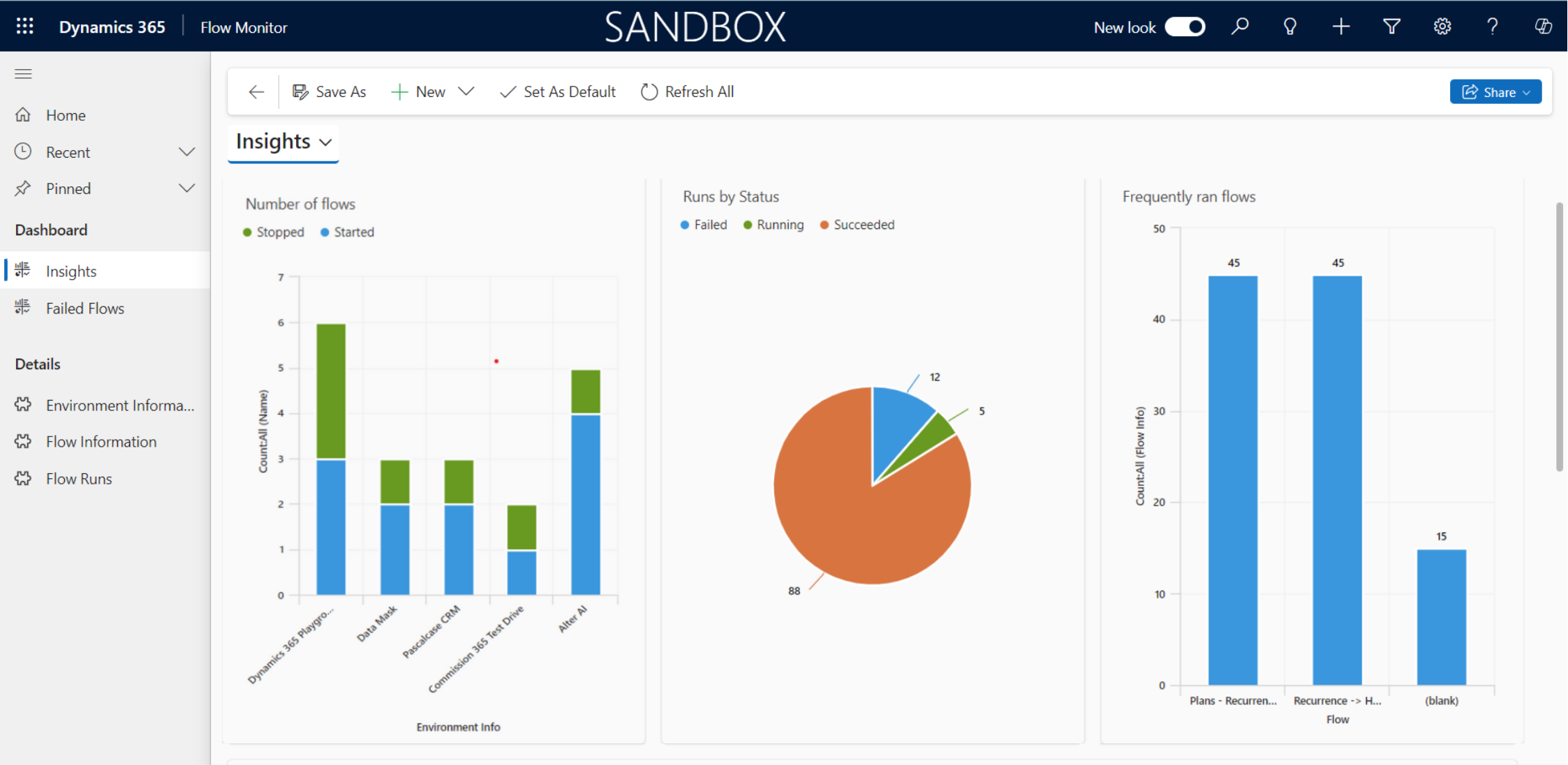
Flow Monitor for Microsoft Power Automate 01

Easily analyze and review the performance and usage of flows in different environments to identify key insights. 
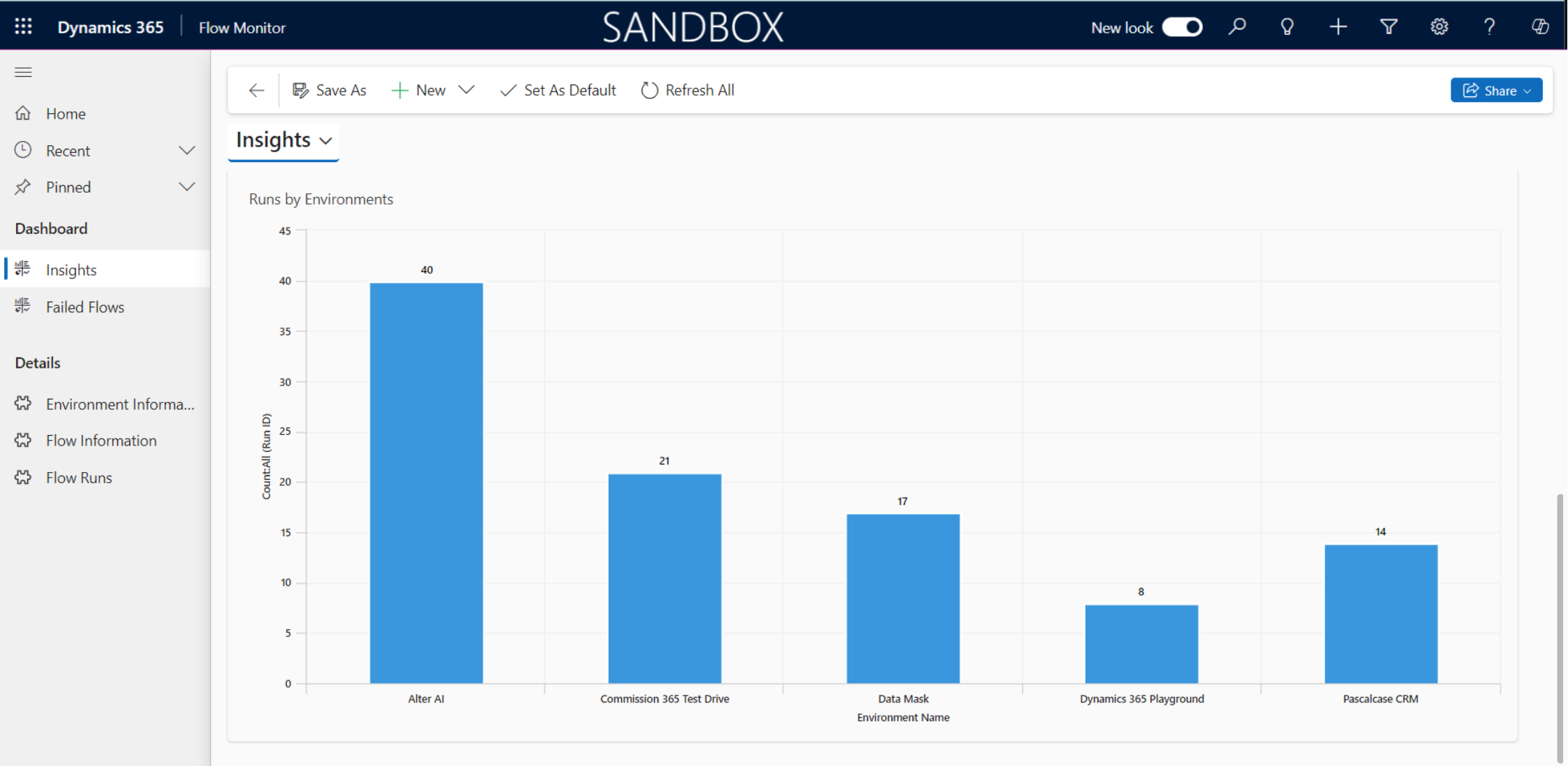
Flow Monitor for Microsoft Power Automate 02

Need help with your business solution?

Our team can help you implement the right solution for your organization.

Get in touch
LogoLogo

Ex-Microsoft experts helping businesses get more from their Dynamics 365 and Power Platform investments.

Products

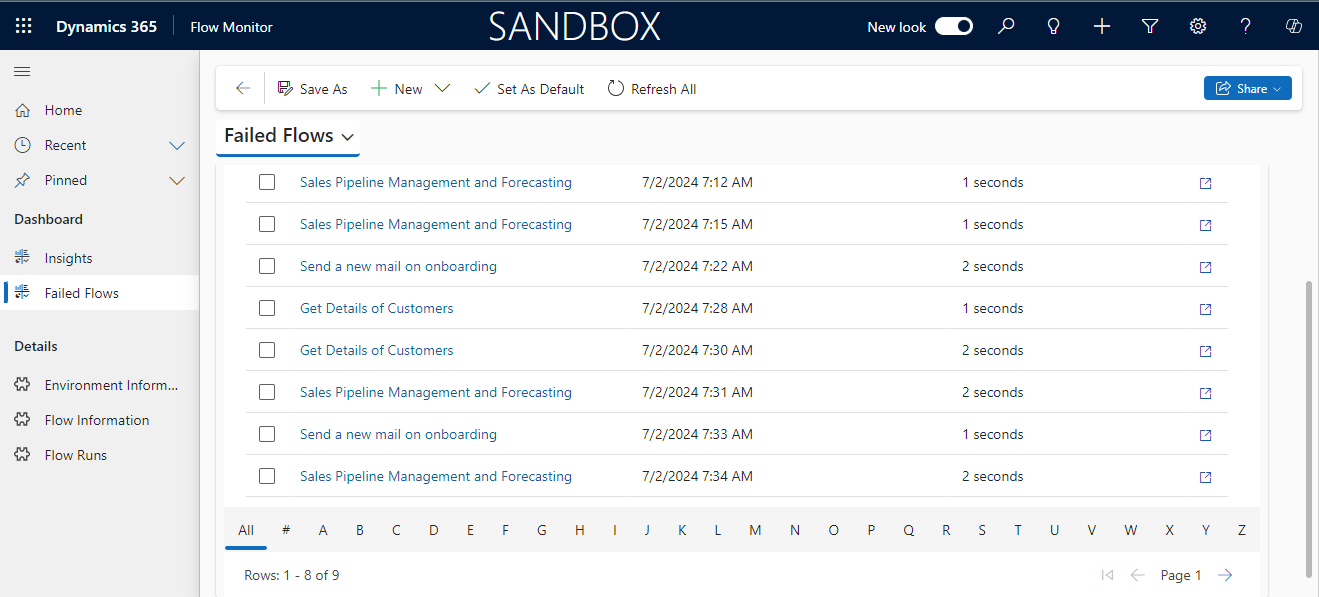
Failed Flows: Specifically focuses on flows that have failed. This section allows you to quickly identify and troubleshoot issues. 

Flow Monitor for Microsoft Power Automate 03

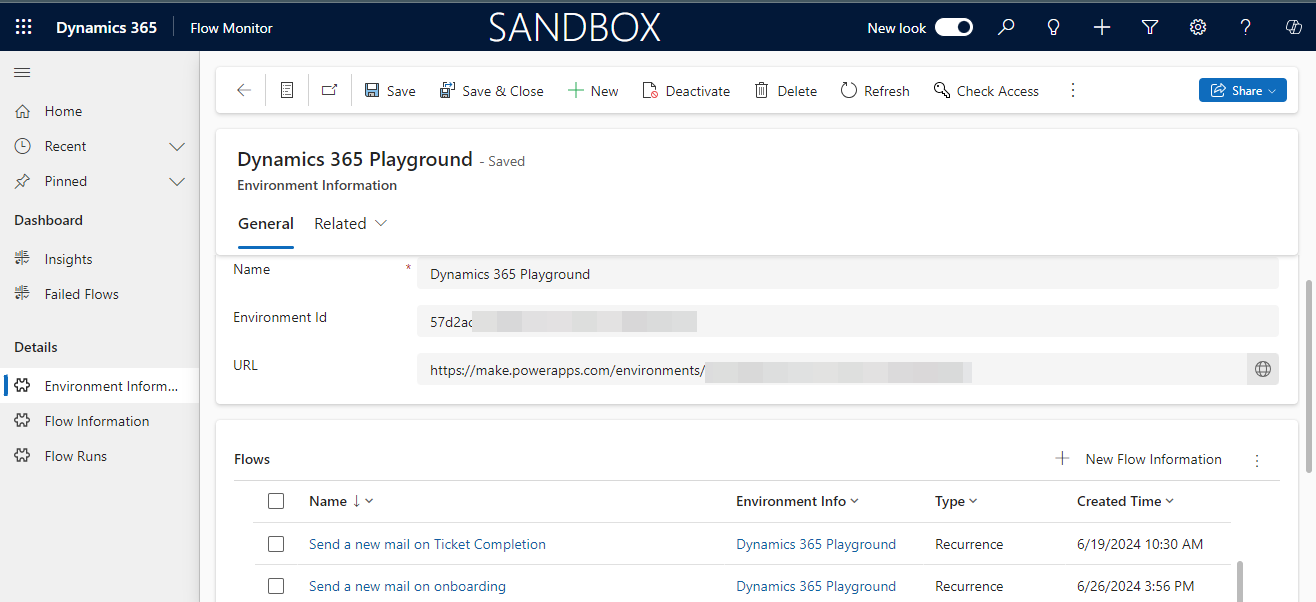
Environment Information: Contains details about the environments in the organization where your flows are running. This includes the environment name, ID, and URL. 

Flow Monitor for Microsoft Power Automate 04

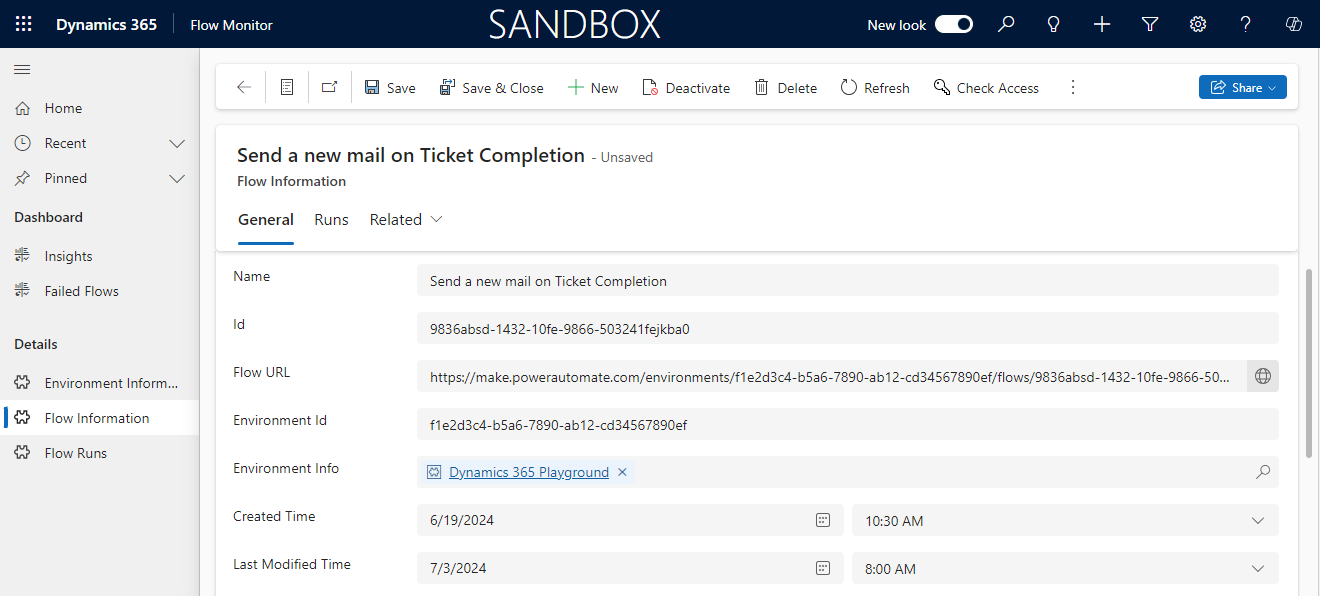
Flow Information: Offers in-depth information about each flow, such as its Name, Environment Info, State, Type, Flow URL, Creation, and Last Modified Time, making it useful for understanding and managing flows. 

Flow Monitor for Microsoft Power Automate 05

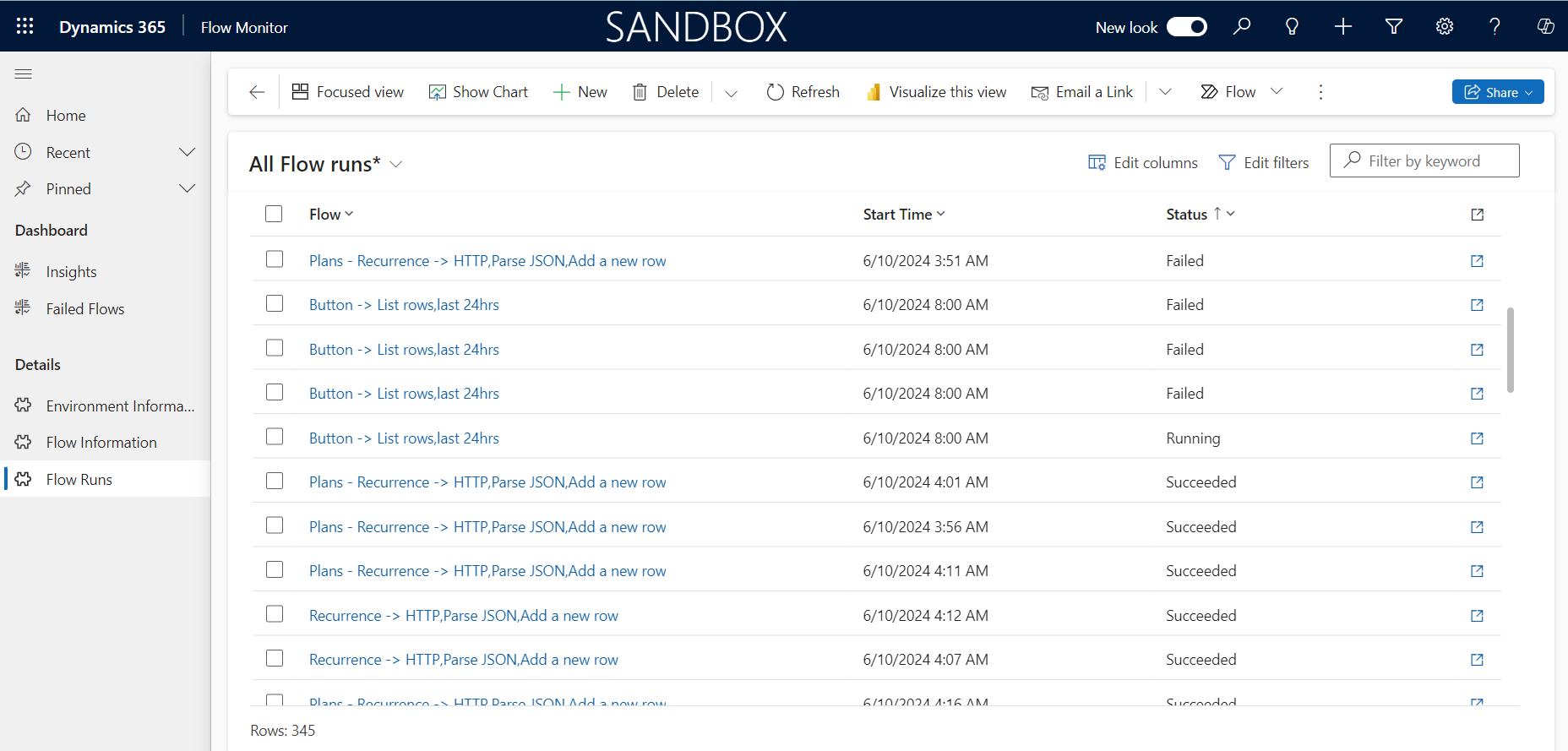
Flow Runs: Provides detailed logs and data about each run of your flows. Here you can see the status, execution times, duration, reason for failures. 

Flow Monitor for Microsoft Power Automate 06

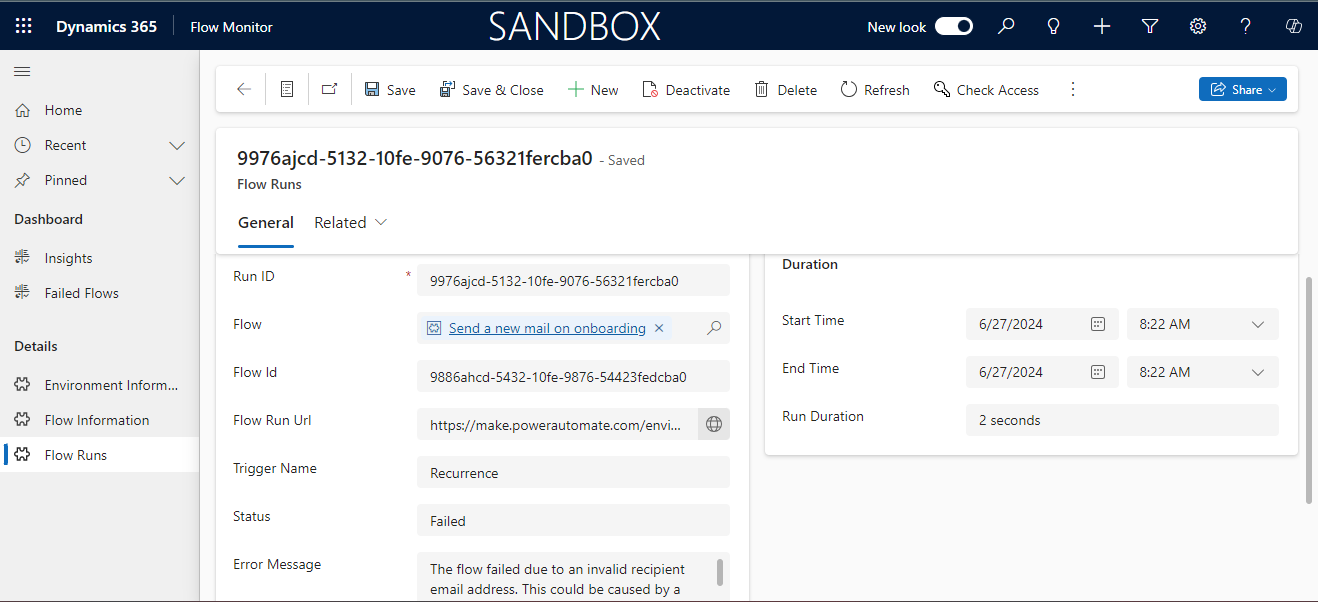
Here is an example of a failed flow run. This detailed tab is clearly labeled with run ID, flow name, and specific error messages that explain why the flow failed to help users quickly identify and resolve issues. 

Flow Monitor for Microsoft Power Automate 07

Note: To access flow details and insights, you must be the owner or co-owner of the flow and have the necessary permissions for the respective environment. 

Frequently Asked Questions (FAQs):

1. What is Flow Monitor?

Flow Monitor is a product by Pascalcase designed for monitoring and managing Power Automate flows across all environments. It is essential for organizations dealing with thousands of flows as it provides detailed information on each flow making it easier to spot issues and fix problems.

2. Can Flow Monitor notify me of flow failures in real time?

Yes, Flow Monitor sends real-time notifications for any failed flows, so you stay updated and quickly address issues.

3. What kind of insights can I gain from Flow Monitor?

Flow Monitor gives you valuable insights into the total number of flows, their statuses (running, stopped, failed), performance across different environments, and detailed data on each flow run.

4. What permissions are required to access Flow Monitor details?

To access flow details and insights, you need to be the owner or co-owner of the flow and have the necessary permissions for the respective environment.

Back to all articles

More from the blog

Adding Generative AI to your Cloud Flows with AI Prompts

Automating Document Signing with Docusign Using Power Automate

Process Mining in Power Automate

Close Case on condition using Power Automate

Integrating AI Hub and Power Automate for intelligent workflows

Creating Sequential Approval in Power Automate

Integrating Hugging Face Models into Power Automate

Save Form's Data & Files to SharePoint after Approval using Power Automate

Metadata Browser
  • HTML To PDF Converter
  • Data Mask for Dataverse
  • Commission 365
  • AI Autocloser
  • Flow Monitor
  • Services

    • D365 Marketing
    • D365 Sales
    • D365 Customer Service
    • D365 Field Service

    Company

    • About Us
    • Blog
    • Contact
    • Careers

    Copyright ©2026 Pascalcase Software Private Limited. All rights reserved.

    Privacy PolicyTerms of Service